
The Perfect Location Page Template for Service Area Businesses
Alright, I am the type of person that just cuts to the chase. I want to skip by the fluff and give you want you are looking for. Below is an example of a perfect location page for a service area business.

The above is just an example, but I have seen this template work for plenty of customers. Let’s explain the different areas.
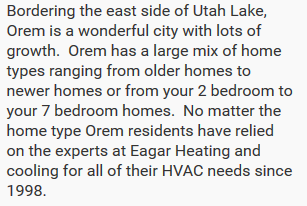
Location Content
This section is usually in paragraph form and should be all about the content. This is your moment to prove you are worthy to service the city you are targeting by helping users understand that you are actually local. Mention things about the city that only local residents would know. Mention how nice the homes are, or what school is nearby. You can also mention how long your business as serviced that area etc. This section should be dedicated to the city you are targeting and include the city name and the sate abbreviation at least once.
Location Image
There are two spots for location images. There really isn’t a limit to the amount of images you can add that are location specific. A location image provides a lot of value to the page. Here are a couple things a location image does.

- Helps users know that they landed on the right page and that you do service the city they were searching for.
- Allows you the opportunity to add alt text to these images that help solidify you as experts within a city. As a reminder, alt images should be about the image. If this image is of the city then you can have the alt image include the city name.
- Google is actually expert at images and can see what is in the image and likely attribute it to the actual location of the image. This could add additional value to the page.
So a location image should be of the city you are targeting. If you are having trouble finding images to include. You can easily go to Google maps, type in the city you are targeting and then take a snap shot of that city and put it on your page…it is that easy. You can also do a couple good searches for images of the city and add those as well (use the shareable images only). The other option of course is for you to take the images yourself of landmarks around the city you are wanting to target.
Call to Action
A page on your website isn’t a page without a call to action. A call to action on your location pages might be the same across all your pages. Whether you want them to call you or to come to your business location. Your call to action must be to the point and clear. Do not forget this step.
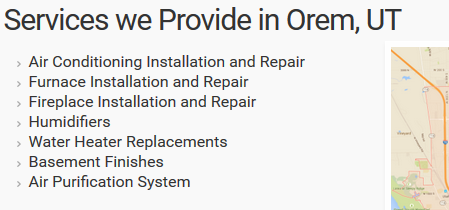
Services Content:
As a service related business you will likely have multiple services that you provide. This section is a simple list. It should include all the services you provide. If you are an HVAC contraction, it can include ‘Heating Repair & Installation”, “A/C Repair & Installation”, “Humidifier Installation”, etc. This should be a simple bullet list and an at a glance view of your services.
Supporting Content
This is one of the most important aspects of your page. Supporting content cannot be ignored and can be continually added to. It is something that search engines can read to help solidify your service and/or target area. Below is a list of ideas for supporting content. Each business is different and should adapt this list to whatever works best for them.
- Service Descriptions Specific to the location
- Customer Testimonials from the specific location
- Case Studies
- Local employees Highlights
- Local Regulations
- Business Awards
- ETC
I have seen customers have huge success using the above template. If you are wanting to target your location or locations outside your physical location, a page like what I explained is an absolute must.